
Article
CIDR Notation Explained: Convert CIDR to a Subnet Mask and Calculate Hosts
Learn what CIDR notation means, how to convert /24 and other prefixes to a subnet mask, and how to work out network, broadcast, and usable hosts, with CCNA-style examples.

Open a routing table, a cloud VPC screen, or a CCNA practice question, and you will see the same short string again and again: 192.168.10.0/24. That slash number is CIDR notation. Once you can read it, convert it to a subnet mask, and turn it into network, broadcast, and host counts, subnetting stops feeling like guesswork.
I teach this in the first week of our networking courses because students who skip the “why” behind the slash spend weeks memorising tables they forget under exam pressure. This article walks through CIDR the way we use it on the whiteboard: plain English, worked IPv4 examples, and the mistakes that show up in real labs. When you want a second opinion on the maths, use our free CIDR calculator or subnet mask calculator.
What Is CIDR Notation?
CIDR stands for Classless Inter-Domain Routing. In practice, CIDR notation is simply an IP address plus a prefix length:
192.168.10.0/24
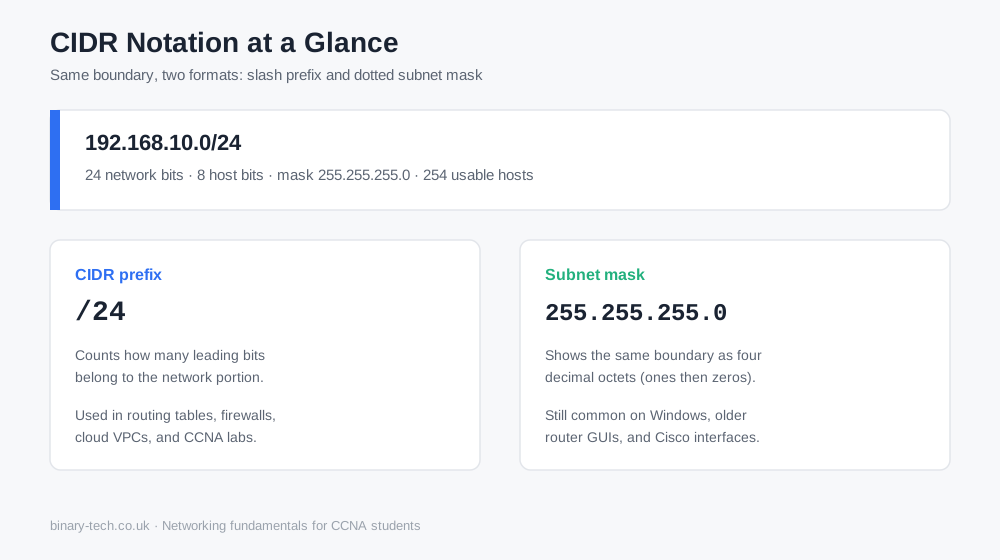
The /24 means the first 24 bits identify the network. The remaining 8 bits identify hosts inside that network. You no longer lean on the old Class A / B / C shortcuts alone. The prefix tells you the size of the block directly.
That matters on live networks. A home Wi-Fi LAN often uses /24. A point-to-point WAN link often uses /30. A campus or cloud VPC might start at /16 and then split into smaller CIDR blocks. Same language, different sizes.
CIDR Prefix vs Subnet Mask
A subnet mask and a CIDR prefix describe the same boundary in two formats:
FormatExampleWhat it showsCIDR/24Count of network bitsSubnet mask255.255.255.0Same bits written as four decimal octets
Windows still loves the dotted mask. Many Cisco and cloud screens prefer CIDR. You need both. If someone hands you 255.255.255.192, you should recognise /26. If a question says /28, you should write 255.255.255.240 without hesitation.
How to Convert CIDR to a Subnet Mask
Use this method every time:
- Start with 32 bits.
- Place ones for the prefix length.
- Fill the rest with zeros.
- Split into four octets and convert each octet to decimal.
Quick example: /24
11111111.11111111.11111111.00000000
255.255.255.0
Slightly harder example: /26
11111111.11111111.11111111.11000000
255.255.255.192
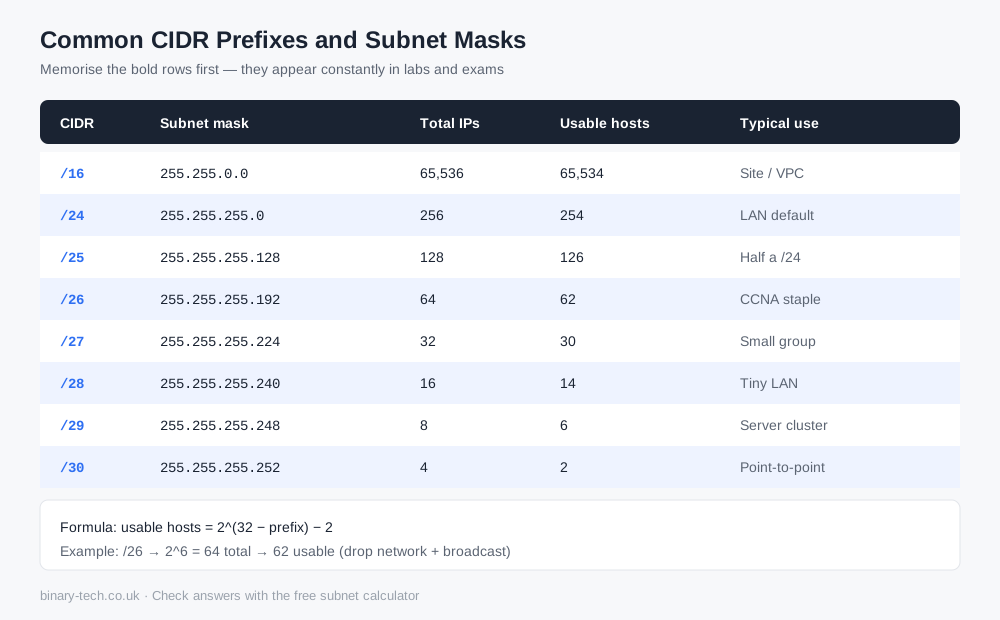
The last octet trips people up. Memorise these four values for CCNA drills:
- 128 → one extra bit in that octet
- 192 → two bits
- 224 → three bits
- 240 → four bits
- 248 → five bits
- 252 → six bits
So /27 ends in .224, /28 ends in .240, and /30 ends in .252.
How Do I Calculate a /24 Network?
Take 192.168.1.0/24.
- Prefix: 24 network bits, 8 host bits
- Subnet mask:
255.255.255.0 - Total addresses: 2^8 = 256
- Usable hosts: 256 − 2 = 254
- Network address:
192.168.1.0 - First usable host:
192.168.1.1 - Last usable host:
192.168.1.254 - Broadcast:
192.168.1.255
That pattern shows up in home networks, small office VLANs, and exam questions. If you can do /24 cold, move straight to /25-/30, because those are where most students lose marks.
How Many Hosts Are in Each Subnet?
The host formula never changes:
usable hosts = 2^(32 − prefix) − 2
You subtract two because the first address is the network ID and the last is the broadcast address. Exceptions exist on some point-to-point links (/31) and single-host routes (/32), but for standard LAN subnetting on CCNA, stick to the −2 rule.
Common counts worth knowing by heart:
/24→ 254 hosts/25→ 126 hosts/26→ 62 hosts/27→ 30 hosts/28→ 14 hosts/29→ 6 hosts/30→ 2 hosts
Worked Example: 192.168.10.0/26
This is the example I put on the board when someone says, “I understand /24, but anything else feels random.”
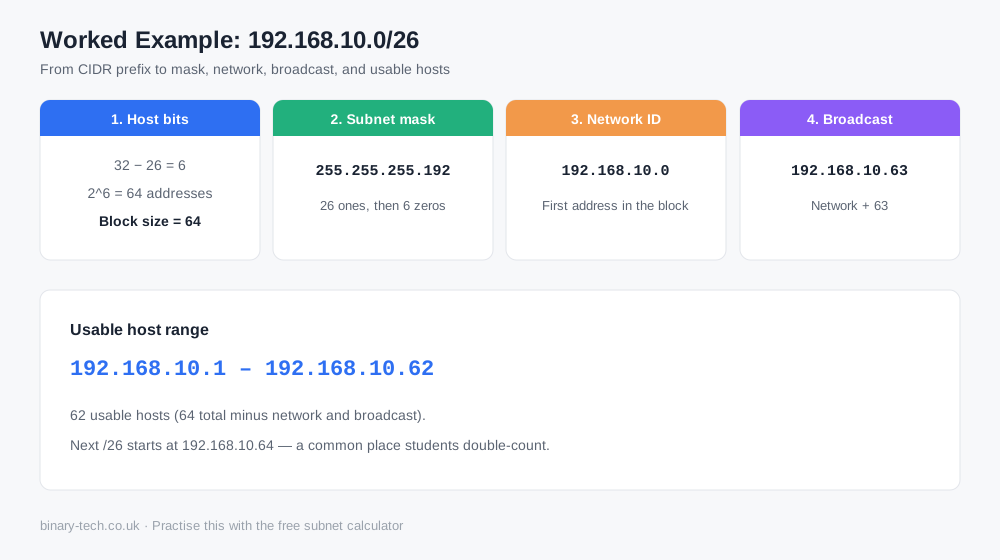
- Host bits = 32 − 26 = 6
- Block size = 2^6 = 64
- Mask =
255.255.255.192 - Network =
192.168.10.0 - Broadcast =
192.168.10.63 - Usable range =
192.168.10.1to192.168.10.62(62 hosts)
The next subnet starts at 192.168.10.64. That boundary is where people make the classic mistake: they reuse an address from the previous block or invent a host that sits on the broadcast.
How Network and Broadcast Addresses Are Calculated
You can do this by hand without a spreadsheet:
- Convert the IP and mask to binary (or use the block-size shortcut).
- Network address = IP with all host bits set to 0.
- Broadcast address = IP with all host bits set to 1.
- Usable hosts sit strictly between those two values.
For /26, the block size shortcut is faster in an exam hall: networks land on multiples of 64 in the last octet (0, 64, 128, 192). Pick the multiple at or below your host address, that is your network ID.
Experience Notes From Teaching and Lab Work
A few patterns come up every term:
- Students convert
/24correctly, then freeze on/26because they never practised the last-octet values. - People confuse “total addresses” with “usable hosts” and lose easy marks.
- On real switches, typing the wrong mask often “works” until a second subnet is added, then overlapping ranges break DHCP and routing.
- Home networks rarely need fancy prefixes, but IT students who only ever touch
192.168.1.0/24struggle the first time a WAN link asks for/30.
If you study for CCNA or Network+, treat a calculator as a marking key, not a crutch. Work the problem on paper, then confirm with the CIDR calculator, subnet mask calculator, or VLSM calculator. That habit builds speed without hiding the binary thinking the exam tests.
How to Practise Without Guessing
- Write the CIDR, mask, block size, network, broadcast, and host count for five prefixes:
/24,/25,/26,/28,/30. - Give yourself a host address such as
192.168.10.77/26and find which subnet it belongs to. - Check every answer in the free tool.
- Repeat until you no longer need the tool for those five prefixes.
That sequence mirrors how we run classroom drills: manual first, tool second, timed set last.
Where This Fits With Binary Tech Courses
CIDR and subnet masks sit under IP addressing and subnetting, core topics for Cisco CCNA preparation and day-one network administration. If you want structured labs, instructor feedback, and practice that goes beyond a single article, browse our IT and networking courses. Pair reading with the free tools when you revise:
- CIDR calculator, paste IPv4 CIDR notation and read mask, network, broadcast, and hosts
- Subnet mask calculator, convert dotted masks ↔ CIDR and check host capacity
- Subnet calculator, network, broadcast, mask, and host range from IPv4 + CIDR
- VLSM calculator, split one block into unequal subnets
- Related reading: private network IP address ranges
CIDR notation looks small on the page. Learn to convert it, size the host pool, and name the network and broadcast addresses, and most of the subnetting questions that stop beginners become routine. Keep practising by hand, verify with the tools, and move on to VLSM once /24 through /30 feel automatic.
Frequently Asked Questions
Keep reading
Related guides
More practical writing on networking, cybersecurity, and IT careers.
 Article
What Is a Passkey, and Why Are Websites Asking You to Create One?
Keep seeing “Create a passkey” when you sign in? Discover how passkeys work, why major tech companies are promoting them and what happens if you lose your phone.
Read article Article
When the Cloud Lost Power: How a London Outage Disrupted Revolut
A Google Cloud outage in London disrupted Revolut on 20 October 2026. Here is what happened, why recovery took time and what businesses can learn about resilience.
Read article Article
France’s Move from Windows to Linux: Why Digital Sovereignty Matters
France’s digital directorate has announced a move from Windows to Linux as ministries prepare wider plans to reduce dependence on non-European technology. We explore the costs, privacy concerns and lessons from the Gendarmerie’s earlier migration.
Read articleReady to learn with a mentor?
Turn what you just read into hands-on skill with a live Binary Tech cohort.