
Article
Private Network IP Address Ranges: The Complete Guide (With Real Examples)
Learn the three RFC 1918 private IP address ranges - 10.0.0.0/8, 172.16.0.0/12, and 192.168.0.0/16 - with real examples, common mistakes, and how to choose the right range for your network.

If you've ever opened a command prompt, typed ipconfig, and seen an address like 192.168.1.15 staring back at you, you've already met a private IP address. Every router, laptop, phone, and smart TV in your home or office uses one. But most people who work with networks day to day still get tripped up by the same handful of questions: which ranges actually count as private, why can't you just pick any address you like, and why does 172.16.x.x behave differently to 172.32.x.x?
We teach this exact topic in the first week of our networking courses, because it's one of those subjects that looks simple on paper and causes real problems the moment someone gets it wrong on a live network. This guide walks through the official private IP ranges, where they come from, how they're actually used, and the mistakes we see students and working IT staff make most often.
What Is a Private IP Address Range?
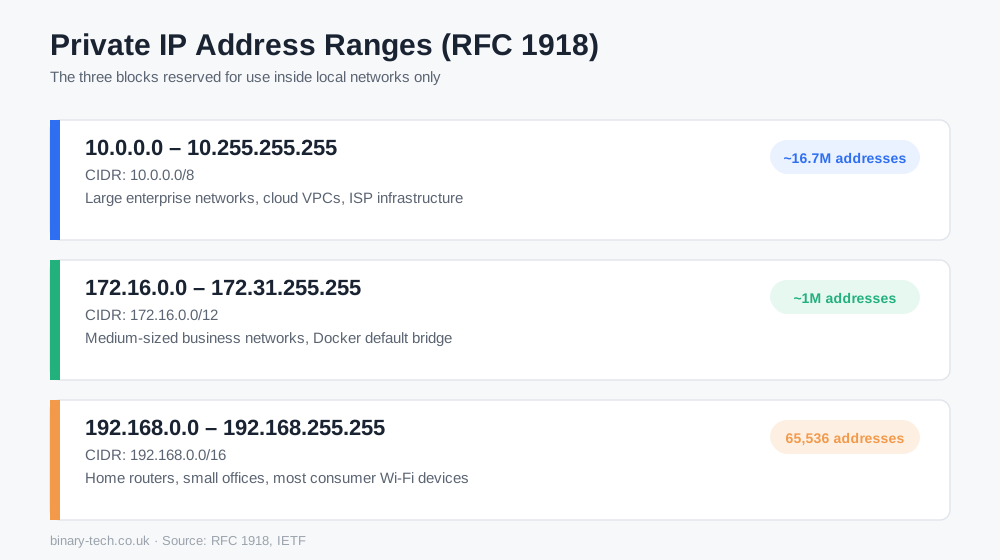
A private IP address range is a block of IP addresses that has been set aside for use inside local networks only. These addresses never travel across the public internet. Your router, your office switch, your home Wi-Fi - they all hand out addresses from these private blocks so that devices on the same network can talk to each other without needing a unique, globally recognised address for every single device.
This system exists because of a rule called RFC 1918, published by the Internet Engineering Task Force back in 1996. At the time, engineers could already see that the internet would eventually run out of the roughly 4.3 billion available IPv4 addresses. RFC 1918 solved part of that problem by reserving three specific blocks of addresses that any network, anywhere in the world, could reuse internally - because they're never routed on the public internet, there's no risk of two organisations clashing.
The Three Official Private IP Address Ranges
Here are the three ranges reserved for private networks, along with the size of each and where you're most likely to see them in the real world.
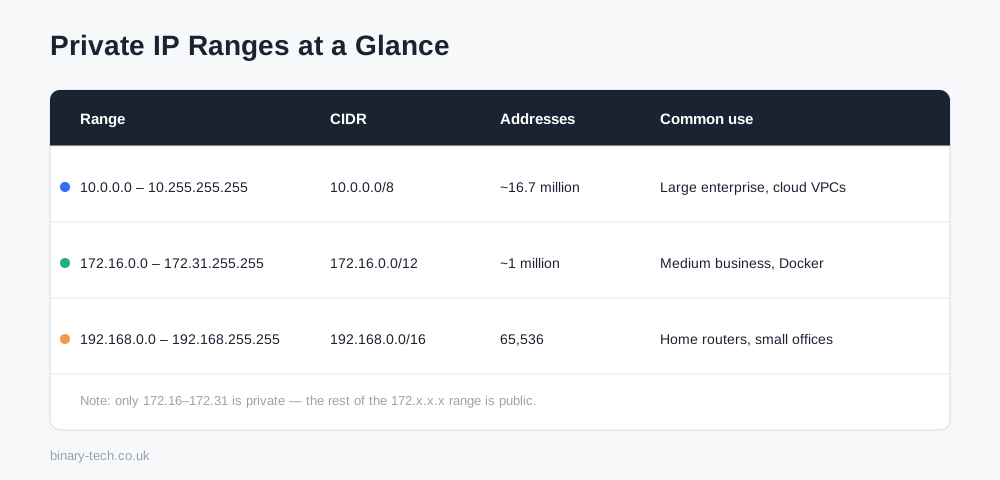
RangeCIDR notationNumber of addressesCommon use10.0.0.0, 10.255.255.25510.0.0.0/8~16.7 millionLarge enterprise networks, cloud VPCs, ISP internal infrastructure172.16.0.0, 172.31.255.255172.16.0.0/12~1 millionMedium-sized business networks, Docker's default bridge network192.168.0.0, 192.168.255.255192.168.0.0/1665,536Home routers, small offices, most consumer Wi-Fi devicesIf you've set up a home router, there's a good chance it defaulted to something in the 192.168.0.x or 192.168.1.x range. That's not a coincidence - manufacturers standardised on this range decades ago because it's small, simple, and more than enough for a household full of devices.
Larger organisations tend to reach for 10.0.0.0/8 instead, because it gives network administrators room to divide the address space into hundreds of smaller subnets - one for each office, department, or VLAN - without ever running out.
The Mistake Almost Everyone Makes: 172.x.x.x Isn't All Private
This is the single most common error we see, even among people who've been working in IT support for a while: assuming that any address starting with 172 is private. It isn't.
Only the addresses from 172.16.0.0 to 172.31.255.255 fall inside the private range. Anything from 172.0.0.0 to 172.15.255.255, and anything from 172.32.0.0 upward, is a public address and can be routed on the open internet.
So 172.20.5.10 is private. 172.32.5.10 is not. We've watched trainees write firewall rules that blocked or allowed the wrong traffic because they assumed the whole 172 block was safe internal space. If you're writing access control lists, filtering rules, or scripts that check for private addresses, always test against the full /12 boundary - not just the first octet.
Private Ranges vs Public IP Addresses
A public IP address is globally unique and reachable from anywhere on the internet - it's what identifies your home network to the outside world, usually assigned by your ISP. A private IP address only has meaning inside your own network. Two different offices on opposite sides of London can both use 192.168.1.1 for their router with zero conflict, because neither address is ever seen outside its own network.
This is where Network Address Translation, or NAT, comes in. NAT is the process your router uses to translate all the private addresses inside your network into a single public address whenever traffic needs to leave for the internet. Without NAT, private IP ranges would be far less useful, because devices using them couldn't reach the internet at all.
Other Reserved and Special-Use Ranges Worth Knowing
Private IP ranges get most of the attention, but a few related ranges come up constantly in real support work:
- Loopback (127.0.0.0/8): Used by a device to refer to itself.
127.0.0.1is the address every computer uses to test its own network stack locally. - APIPA (169.254.0.0/16): Windows and other operating systems assign an address from this range automatically when a device can't reach a DHCP server. Seeing a
169.254.x.xaddress on a device is usually a sign that DHCP has failed somewhere. - IPv6 Unique Local Addresses (fc00::/7): The IPv6 equivalent of RFC 1918 - a private address space that isn't routed on the public IPv6 internet.
- CGNAT (100.64.0.0/10): Used by ISPs to share a single public IP address across many customers, separate from the standard RFC 1918 ranges.
Choosing the Right Private Range for Your Network
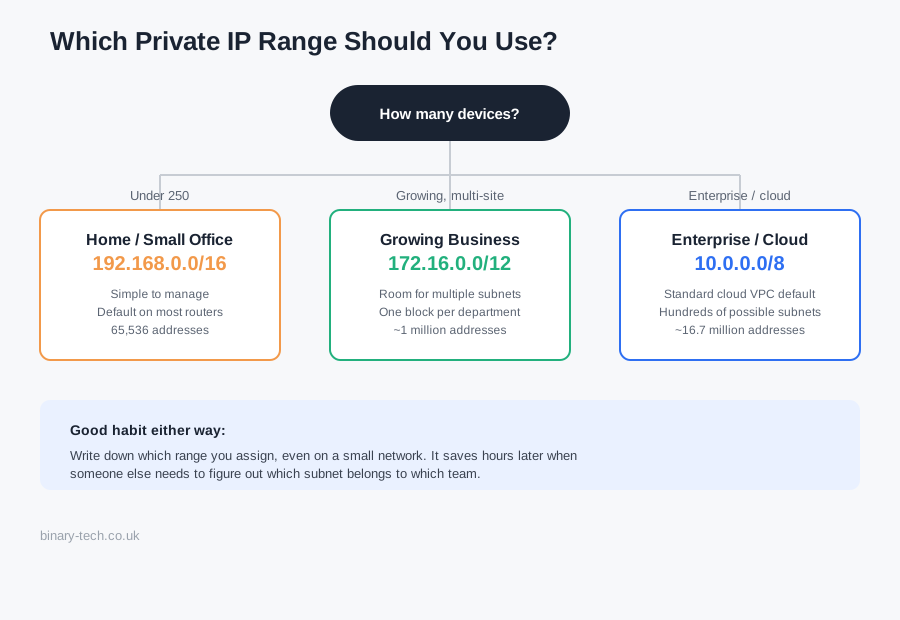
- Home or small office (under 250 devices):
192.168.0.0/16is simple to manage and instantly familiar to most equipment. - Growing business with multiple departments or sites:
172.16.0.0/12gives you room to create separate subnets per team without switching ranges later. - Large enterprise or anyone planning cloud infrastructure:
10.0.0.0/8is the standard choice, and it's also what most cloud providers default to when you build a virtual private cloud.
One habit worth building early: document every range you assign, even on a small network. We've had students inherit networks at work where nobody wrote down which subnet belonged to which department, and untangling that after the fact takes far longer than setting it up properly would have.
Understanding private IP ranges is one of the first practical skills you'll build in networking, and it comes up in almost every certification path - from CCNA through to more advanced infrastructure and security roles. If you'd like to go deeper with hands-on labs and live instruction rather than just reading about it, take a look at our IT & Networking courses.
Practise related skills with our free subnet calculator and VLSM calculator.
Frequently Asked Questions
Keep reading
Related guides
More practical writing on networking, cybersecurity, and IT careers.
 Article
What Is a Passkey, and Why Are Websites Asking You to Create One?
Keep seeing “Create a passkey” when you sign in? Discover how passkeys work, why major tech companies are promoting them and what happens if you lose your phone.
Read article Article
When the Cloud Lost Power: How a London Outage Disrupted Revolut
A Google Cloud outage in London disrupted Revolut on 20 October 2026. Here is what happened, why recovery took time and what businesses can learn about resilience.
Read article Article
France’s Move from Windows to Linux: Why Digital Sovereignty Matters
France’s digital directorate has announced a move from Windows to Linux as ministries prepare wider plans to reduce dependence on non-European technology. We explore the costs, privacy concerns and lessons from the Gendarmerie’s earlier migration.
Read articleReady to learn with a mentor?
Turn what you just read into hands-on skill with a live Binary Tech cohort.